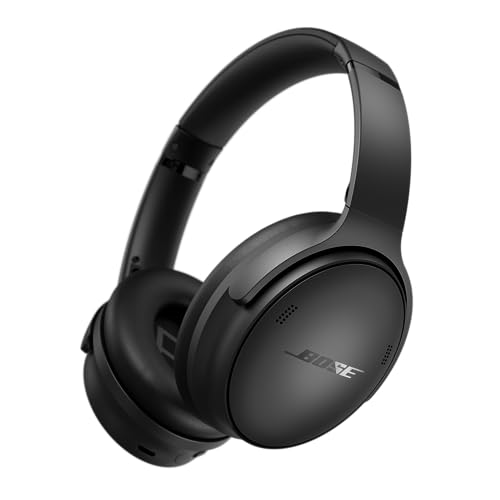
Your Bose QuietComfort 35 headphones still sound great. The noise cancelling still knocks out engine drone. But lately the battery barely makes it through a workday, and last week the charging light refused to turn green at all.
That is not the end of your headphones. It is usually just the end of one small part.
Bose does not sell the QC35 as a user-serviceable battery product — the battery is soldered inside the left earcup. But a 600mAh 2.22Wh Li-ion replacement battery is available, installs in about 30–45 minutes, and gives the QC35 and QC35 II a fresh start at a fraction of the cost of new headphones.
This guide covers why the battery fails, how to tell whether yours is actually dead, what a replacement costs, and which listening situations benefit most.
Quick Specs: What You Are Getting
| Specification | Detail |
| Capacity | 600mAh / 2.22Wh |
| Voltage | 3.7V nominal / 4.2V full charge |
| Chemistry | Li-ion (soft-pack cell) |
| Part number | QC35 |
| Compatible models | Bose QuietComfort 35 (QC35) and QuietComfort 35 II (QC35 II) |
| Charging port | Micro-USB (original port on the right earcup) |
| Certifications | CE, RoHS, FCC, UL-style protection circuitry (BMS) |
| Warranty | Typically 12 months, 30-day return |
Because the cell is a direct-fit replacement inside the left earcup, the headphone firmware reads it exactly as it read the original — no pairing, no reset, no app trickery required.
What the Original Battery Is Rated For
Bose rates the QC35 family at up to 20 hours wireless with noise cancelling on, and up to 40 hours when used wired with ANC active. A full charge takes roughly 2.25 hours over Micro-USB, and a 15-minute quick charge buys about 2.5 hours of wireless playback.
That is the benchmark. When your headphones start behaving below it — noticeably below, consistently — you are not imagining things.
Symptom 1: Battery Life That Keeps Shrinking
Short runtime is the most common and most honest symptom. It usually progresses like this:
- 8 hours became 6. You start topping up at lunch.
- 6 became 3. You carry a power bank on flights.
- 3 became 40 minutes. You hear “Battery low, please charge now” within one podcast episode.
- The green light lies. It shows full, then dies in minutes — a sign the cell reports high voltage but cannot hold a load.
That final stage is the clearest evidence of a worn cell rather than a software glitch. Battery gauges estimate charge from voltage; an aged cell sags under the current draw of the amplifier and ANC chip, so the gauge reads “full” and then collapses.
What it is not: Bluetooth codec choice, ANC mode, or volume level can shift runtime by 10–20%, but they do not turn 20 hours into 3. If the drop is dramatic and permanent, it is the cell.
Symptom 2: The Battery Won’t Charge
A QC35 that will not charge has several possible culprits, and you should rule out the cheap ones first — before buying anything.
Step-by-step diagnosis
- Swap the cable. Micro-USB cables fail far more often than batteries do. Try two known-good cables.
- Swap the power source. Use a wall adapter, not a laptop USB port that may be asleep or current-limited.
- Watch the LED behaviour. This is the fastest diagnostic on the QC35:
| Battery indicator | Meaning | Verdict |
| Blinking amber | Charging normally | Healthy — wait |
| Solid green | Medium to full charge | Healthy |
| Solid amber | Low charge | Healthy |
| Blinking red | Needs to charge | Healthy — leave it plugged in |
| Solid red | Charging error | Battery or circuit fault |
| No light at all | No charge accepted | Likely dead cell or broken lead |
- Leave it plugged in for 30 minutes untouched. Deeply discharged cells enter a slow pre-charge phase and may show no light for several minutes.
- Check for physical damage. A swollen earcup cover, a bulge under the left cushion, or a warm patch that stays warm after unplugging means stop charging immediately. A swollen cell is a safety issue, not a performance issue.
If a known-good cable, a known-good charger, and 30 minutes produce a solid red light or nothing at all, the cell has failed. That is exactly the case a replacement battery solves.
How to Tell If the Battery Is Actually Damaged: A 5-Point Checklist
Run this before you spend a cent.
| # | Test | Healthy result | Failing result |
| 1 | Runtime test — charge to 100%, play at 50% volume with ANC high, time it | 15–20 hours | Under 8 hours |
| 2 | Rest-drain test — charge full, power off, leave 72 hours, power on and check level | 90%+ remaining | Below 80% |
| 3 | Indicator test — plug in and read the LED | Amber blinking → green | Solid red, or no light |
| 4 | Thermal test — feel the left earcup 10 minutes after unplugging | Cool | Warm to the touch |
| 5 | Physical test — press gently on the left earcup cover | Flat, firm | Bulging, spongy, or the cover lifts |
Scoring: two or more failing results = replace the battery. One failing result = retest in a week; keep an eye on it. Zero = your headphones are fine, and the problem is elsewhere (firmware, cable, or Bluetooth source).
When the problem is not the battery
- Headphones will not power on but charged fine yesterday → check the power button and try a firmware update through the Bose app.
- Cuts out when the cable moves → the 2.5 mm audio cable, not the battery.
- Left earcup silent → driver or solder joint, not the cell.
- Random shutdowns while music is playing at high volume → could be either. A voltage-sagging aged cell is the usual suspect on a 5+ year old unit.
How a Replacement Is Installed (Overview)
The QC35 battery sits in the left earcup and connects via three soldered leads. It is a moderate DIY job — not a beginner’s first repair, but very doable with basic tools.
You will need: a Phillips #00 screwdriver, plastic opening picks, a spudger, a heat gun or hairdryer on low, a soldering iron, and replacement adhesive.
Rough sequence:
- Discharge below 25% before opening. This is a safety step, not a suggestion — it reduces the risk of a thermal event if the cell is nicked.
- Pop off the left earcup cushion (it is held by plastic clips).
- Peel back the protective cloth; warm it gently if the adhesive resists.
- Remove the two Phillips screws, then pry up the plastic cover.
- Shield the driver with a piece of card, then warm the battery cover (max ~100°C, never pointed straight down) to soften its adhesive.
- Desolder the three leads. Photograph the wire order first — this is the single most common mistake.
- Pry the old cell out with a plastic spudger. Never use metal tools near a soft-pack cell.
- Clean the battery well with isopropyl alcohol, fit the new cell, solder the leads back in the same order.
- Test power-on before applying new adhesive.
- Calibrate: charge to 100%, then leave it on the charger for another two hours.
Not comfortable with a soldering iron? Any independent phone or headphone repair shop can do this in under an hour; the battery itself is the only part you need to supply.
Where This Battery Actually Changes Your Day: Use Cases
Battery specs on a listing page are abstract. Here is what 600mAh of healthy capacity means in practice.
Long-haul flights
ANC is the biggest single power draw on a QC35 — and a flight is the one place you cannot top up. A failing cell that dies in 3 hours turns a 12-hour flight into a silent one. A healthy replacement covers most transatlantic routes on a single charge, with the wired 40-hour mode as a backup if you plug into the seat entertainment system.
Open-plan office and deep-work sessions
The QC35 is a focus tool: ANC on, music low, eight hours of uninterrupted work. A worn battery forces a mid-afternoon recharge, and the QC35 does not play while charging — you lose the headphones precisely when you needed them. This is the use case where the runtime test in Section 5 matters most.
Daily commute
Two 45-minute commutes plus a gym session is about 2 hours a day, or 10 hours a week. Original capacity means charging once a week. Degraded capacity means charging every other day — and forgetting once means a silent train ride.
Remote work and calls
Seven microphones, Bluetooth 4.2, and hours of conference calls. Voltage sag on an aged cell shows up as dropouts and unexpected disconnects mid-call, which gets blamed on the meeting platform instead of the battery.
Gaming and wired sessions
In wired mode with ANC on, the QC35 II is rated to 40 hours — the cell still powers the ANC circuitry even without Bluetooth. Gamers who run long sessions on a wired connection are often surprised that a “wired” headset still dies; the battery is why.
Travel and storage
Headphones left in a drawer for months at 0% sulfate and lose capacity permanently. If your QC35 lives in a case between trips, recharge it to about 60% every two to three months.
Battery Care: Making the Replacement Last
A fresh cell treated well should give you 3–5 years of regular use.
- Stay in the 20–80% band when convenient. Full discharge cycles age a cell fastest.
- Do not leave it plugged in for days. The QC35 has protection circuitry, but constant top-ups at 100% still accelerate wear.
- Heat is the enemy. Do not charge in a hot car, on a radiator, or under a pillow.
- Recharge stored headphones every 2–3 months to roughly 60%.
- Turn ANC off when you do not need it — it is the largest continuous drain.
- Use the auto-off feature so the headphones do not sit powered on in a bag.
- Clean the contacts with isopropyl alcohol on a lint-free cloth if charging becomes intermittent.
Frequently Asked Questions
Is the QC35 battery replaceable? Yes. It is not officially user-replaceable — Bose treats it as a service item and the cell is soldered in — but a direct-fit 600mAh 2.22Wh replacement is widely available and installs in the left earcup.
Does this battery fit both the QC35 and the QC35 II? Yes. The QuietComfort 35 and QC35 II share the same battery well, connector position, and lead layout. One part number covers both.
Will 600mAh give me the full 20 hours? 600mAh / 2.22Wh matches the original cell’s rating, so a healthy new battery restores original-class runtime. Real-world figures depend on volume and ANC mode: expect close to 20 hours wireless, up to 40 hours wired.
My new battery shows 0% and will not charge — is it defective? Usually not. New cells often ship in a low-voltage storage state. Leave it on a charger for 30–60 minutes before judging it, then run two or three full charge/discharge cycles to let the gauge calibrate.
Can I use the headphones while charging? No. The QC35 does not play while charging — this is by design, not a fault.
How long does the repair take? 30–45 minutes for someone comfortable with a soldering iron; under an hour at a repair shop.
Will replacing the battery fix Bluetooth dropouts? Sometimes. If dropouts come with sudden volume drops or unexpected shutdowns at high volume, they are often voltage-sag symptoms. If they happen at 90% charge with a stable connection, look at firmware or the source device instead.
How do I dispose of the old cell? Take it to an e-waste or battery recycling point. Do not puncture it or put it in household trash.
The QC35 and QC35 II are still excellent headphones — the drivers, the ANC array, and the build have not gotten worse with age. Only the cell has.
If your runtime has collapsed, the charging light stays red, or the left earcup feels warm after unplugging, the diagnosis is straightforward and the fix is a 600mAh 2.22Wh Li-ion replacement battery. Thirty to forty-five minutes of work buys back years of listening.