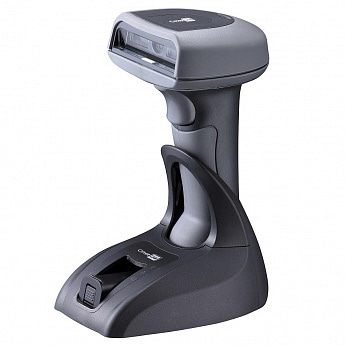
A barcode scanner that suddenly runs out of power can slow down routine work, especially when it is used continuously for inventory, retail, or warehouse tasks. If your CipherLab 1560, 1562, or 1564 no longer holds a charge as it used to, the BA-001800 battery may be reaching the end of its service life.
The 800mAh BA-001800 replacement battery is designed for compatible CipherLab barcode scanner models and can help restore more reliable operating time.
When Your CipherLab Battery Does Not Last Long
One of the most common signs of an aging battery is noticeably shorter runtime. You may fully charge the scanner, use it for a short period, and then find that the battery level drops quickly.
For example, a CipherLab scanner that previously worked through a normal shift may now need to be placed back on the charger several times during the day. Frequent charging can become inconvenient when the scanner is needed for continuous barcode scanning.
A battery replacement can be considered when the reduced runtime continues even after checking the charger, charging contacts, and normal power settings.
Why Is My CipherLab Battery Not Charging?
A CipherLab 1560, 1562, or 1564 may sometimes appear unable to charge. Before replacing the battery, check whether the charging cradle, adapter, and contacts are working correctly.
If the scanner remains at the same battery level for a long time, shuts down shortly after being connected to the charger, or only charges intermittently, the battery may be worn out. Dirty or poorly connected charging contacts can also cause charging problems, so they should be checked first.
If the charging equipment works normally but the battery still cannot hold or accept a charge, replacing the BA-001800 battery may be a practical solution.
How to Tell If the Battery Is Damaged
Several symptoms can indicate that the battery needs replacement:
The scanner loses power much faster than before, even during light scanning work. The battery percentage may also drop suddenly instead of decreasing gradually.
Another warning sign is unexpected shutdown. If the CipherLab scanner turns off while there is still a battery percentage displayed, the battery may no longer be able to provide stable power.
You can also check whether the scanner charges normally. If charging takes unusually long or the battery quickly loses power after charging, the battery’s capacity may have significantly decreased.
Before installing a replacement, make sure the issue is not caused by the charger, charging cradle, contacts, or another scanner component.
BA-001800 800mAh Battery Replacement
The BA-001800 battery has an 800mAh capacity and is intended as a replacement battery for compatible CipherLab barcode scanners.
It is compatible with:
- CipherLab 1560
- CipherLab 1562
- CipherLab 1564
When choosing a replacement, always compare the battery part number and scanner model with your existing battery. Checking the connector and battery specifications before installation can help avoid compatibility problems.
Where Can a Replacement Battery Be Useful?
A replacement battery can be useful in many environments where CipherLab barcode scanners are used regularly.
In retail stores, scanners may be used throughout the day to scan product labels, check inventory, or process merchandise.
In warehouses, a reliable battery is important for repeated barcode scanning during receiving, picking, packing, and stock checks.
In logistics operations, handheld scanners may be used while moving between different work areas. A battery with significantly reduced capacity can interrupt these tasks and require frequent charging.
The same issue can occur in inventory management and other barcode-scanning applications where the device needs to remain available for extended periods.
Tips After Replacing the Battery
After installing a new BA-001800 battery, make sure the battery is properly connected and that the scanner recognizes it correctly. Use a compatible charging setup and keep the charging contacts clean.
It is also helpful to avoid storing the scanner for long periods with a completely depleted battery. If the device will not be used for some time, store it in a suitable environment and check the battery periodically.
For businesses that rely on CipherLab scanners every day, keeping a compatible replacement battery available can also reduce downtime when an aging battery suddenly becomes unusable.
If your CipherLab 1560, 1562, or 1564 has noticeably shorter battery life, charging problems, or unexpected shutdowns, checking the BA-001800 battery is a good starting point. A compatible 800mAh replacement battery can help return the scanner to more dependable daily operation.