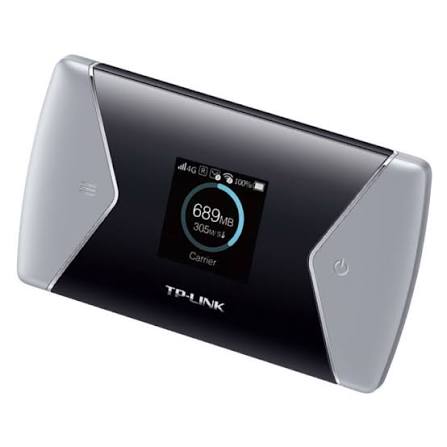
A reliable battery is essential for a portable WiFi router. Whether you use your TP-Link M7650 or M7450 at work, while traveling, or as a backup internet connection, a weak battery can quickly become frustrating. If your router now runs for a much shorter time, shuts down unexpectedly, or refuses to charge, the battery may be reaching the end of its service life.
The 3000mAh TBL-53B3000 battery replacement is designed for compatible TP-Link mobile WiFi router models, including the TP-Link M7650 and M7450. Replacing an aging battery can help restore convenient portable use and reduce the need to keep the router connected to a charger.
Why Does the TP-Link M7650 or M7450 Battery Drain So Quickly?
Battery capacity naturally decreases after repeated charging and discharging cycles. An older battery may no longer provide the same runtime as it did when the router was new.
Several common symptoms can indicate battery aging:
- The TP-Link M7650 battery drains much faster than before.
- The TP-Link M7450 needs frequent charging.
- The router shuts down even when the battery indicator still shows charge.
- Battery percentage drops suddenly.
- The router becomes difficult to use away from a power source.
- The battery does not hold a charge overnight.
- The device gets unusually warm during charging or operation.
Heavy network usage can also increase power consumption. Connecting multiple devices, using a strong mobile data signal, downloading large files, or keeping the router active for long periods can cause faster battery drain.
However, if the runtime has become dramatically shorter compared with the original performance, replacing the battery may be a practical solution.
TP-Link M7650 and M7450 Battery Replacement
The TBL-53B3000 battery has a capacity of 3000mAh and is intended as a replacement option for compatible TP-Link mobile WiFi routers.
Before purchasing a replacement battery, always check the battery model number, connector, physical dimensions, voltage specifications, and compatibility with your exact device.
A replacement battery can be particularly useful when the original battery has experienced significant capacity loss. Instead of relying on a wall charger or power bank all the time, a healthy replacement battery can make the mobile router more convenient for portable use again.
TP-Link M7650 Battery Not Charging: What Should You Check?
If your TP-Link M7650 battery is not charging, the battery itself may not always be the problem. Try several basic checks first.
1. Check the charging cable and adapter
A damaged cable, loose connector, or unsuitable power adapter can prevent normal charging. Try a known-good compatible charging setup.
2. Restart the router
Turn off the TP-Link M7650, remove the battery if possible, wait briefly, and then reinstall it. Restarting the device can sometimes resolve temporary charging or battery-status problems.
3. Check the battery contacts
Dust or oxidation on the battery contacts can interfere with the electrical connection. Make sure the contacts are clean and properly aligned.
4. Observe the charging indicator
If the charging indicator does not respond at all, even with a known-good charger, the battery or charging circuit may require further inspection.
5. Test with another compatible battery
If the router works normally with another known-good compatible battery, the original battery is more likely to be worn out or defective.
How to Know If Your TP-Link Battery Is Damaged
A battery may need replacement when several warning signs appear together.
Short runtime: The router previously worked for hours but now shuts down much sooner.
Unexpected shutdowns: The device turns off during normal use despite showing remaining battery power.
Charging problems: The battery takes an unusually long time to charge or cannot reach a normal charge level.
Rapid percentage changes: The battery indicator jumps from a high percentage to a low percentage within a short period.
Physical swelling: A visibly swollen or deformed lithium-ion battery should not be used. Stop using it and replace it safely.
Excessive heat: Unusual heat during charging or normal operation can indicate a battery or device problem. Discontinue use if the battery becomes abnormally hot.
It is important to distinguish battery aging from other hardware problems. If a replacement battery shows the same symptoms, the router’s charging circuit or power-management system may require professional inspection.
Where Can You Use a TP-Link M7650 or M7450 with a Replacement Battery?
A portable WiFi router is useful in many situations where fixed broadband is unavailable or inconvenient.
Travel
Take your mobile router on business trips, vacations, or road trips. A healthy battery allows you to create a WiFi hotspot without constantly searching for a power outlet.
Remote Work
When working from a café, hotel, temporary office, or other location, a portable router can provide a convenient mobile internet connection.
Outdoor Activities
Camping, outdoor events, and other activities can benefit from portable internet access. A replacement battery helps extend the practical usefulness of the router when mains power is unavailable.
Backup Internet
A TP-Link M7650 or M7450 can also serve as a backup connection during temporary broadband interruptions. Keeping a reliable battery installed means the router can be used when needed instead of remaining permanently connected to a charger.
Daily Mobile Connectivity
Students, commuters, and people who frequently move between locations can use a portable WiFi router for flexible internet access throughout the day.
Tips to Extend the Life of Your TP-Link WiFi Router Battery
A replacement battery is an investment, so proper usage can help maintain its performance.
- Avoid exposing the battery to extreme temperatures.
- Use a compatible charger and charging cable.
- Do not intentionally drain the battery to 0% repeatedly.
- Avoid storing the router with a completely discharged battery for a long time.
- Keep the router away from excessive heat while operating.
- If the router is stored for an extended period, check the battery periodically.
- Stop using a battery if it becomes swollen, damaged, or unusually hot.
Is a 3000mAh TBL-53B3000 Replacement Battery Right for You?
If your TP-Link M7650 or M7450 battery drains quickly, cannot hold a charge, or frequently causes unexpected shutdowns, a compatible replacement battery can restore the convenience of portable operation.
The 3000mAh TBL-53B3000 battery replacement is a suitable option to consider for compatible TP-Link WiFi router models. Always verify the exact battery model and device compatibility before installation.
A reliable battery means less dependence on a wall outlet and more freedom to use your mobile WiFi router while traveling, working remotely, commuting, or enjoying outdoor activities.