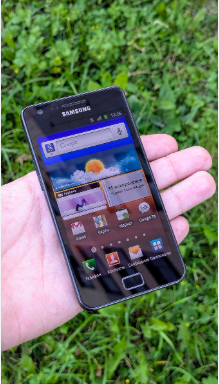
As smartphones age, battery performance naturally declines. If you’re using a Samsung Galaxy device such as the I9100, I9108, I9103, I777, I9050, or B9062, and you’ve noticed shorter battery life or charging issues, replacing the battery may be the most effective solution. The EB-F1A2GBU 1650mAh/6.11Wh replacement battery is designed to restore reliable power and help extend the usability of your device.
In this guide, we’ll cover common battery problems, how to identify a failing battery, and the best usage scenarios for replacing your Samsung battery.
Compatible Models
The EB-F1A2GBU battery is compatible with various Samsung smartphones, including:
- Samsung Galaxy S II I9100
- Samsung I9108
- Samsung I9103
- Samsung I777
- Samsung I9050
- Samsung B9062
Always verify your original battery model number before purchasing a replacement.
Why Is My Battery Draining So Quickly?
One of the most common signs of battery aging is reduced runtime.
Common Causes of Short Battery Life
Battery Aging
Lithium-ion batteries gradually lose capacity after hundreds of charge cycles. A battery that once lasted all day may only provide a few hours of use.
Background Applications
Older devices often struggle with multiple apps running simultaneously, increasing battery consumption.
High Screen Brightness
Keeping the display brightness at maximum levels can significantly shorten battery life.
Weak Network Signals
When your phone constantly searches for cellular or Wi-Fi signals, power consumption increases dramatically.
Signs You Need a New Battery
- Battery percentage drops rapidly.
- Phone shuts down unexpectedly.
- Battery drains even when idle.
- Frequent charging is required throughout the day.
What to Do If the Battery Won’t Charge
Charging problems are another common issue with older smartphones.
Check the Charging Cable and Adapter
Damaged charging accessories can prevent proper charging. Try using a different charger to rule out accessory issues.
Inspect the Charging Port
Dust, lint, or corrosion inside the charging port can interfere with charging connections.
Restart the Device
A software glitch may temporarily prevent the charging process. Restarting the phone can sometimes resolve the issue.
Battery End-of-Life
If the battery remains at a low percentage or refuses to charge despite troubleshooting, it may have reached the end of its lifespan.
How to Tell If the Battery Is Damaged
Before replacing the battery, it’s important to identify whether the battery itself is faulty.
Physical Inspection
Remove the battery and check for:
- Swelling or bulging
- Cracks or deformation
- Leakage
- Excessive corrosion on contacts
A swollen battery should be replaced immediately.
Overheating During Use
If the battery becomes unusually hot during charging or normal operation, internal damage may be present.
Rapid Power Loss
A damaged battery often loses charge quickly, even after reaching 100%.
Unexpected Shutdowns
Phones that suddenly power off despite showing remaining battery percentage frequently indicate battery degradation.
Benefits of Replacing the EB-F1A2GBU Battery
Installing a new replacement battery can significantly improve device performance.
Longer Operating Time
A fresh battery restores much of the original runtime, reducing the need for constant charging.
Improved Reliability
You can use your phone without worrying about unexpected shutdowns.
Better Charging Performance
New batteries typically charge more efficiently and maintain stable voltage output.
Extended Device Lifespan
Replacing the battery allows older Samsung devices to remain useful for communication, media playback, and daily tasks.
Ideal Usage Scenarios
The EB-F1A2GBU replacement battery is suitable for various situations.
Daily Communication
Perfect for calls, messaging, and social networking throughout the day.
Backup Smartphones
Many users keep older Samsung Galaxy devices as secondary phones. A new battery ensures they remain ready when needed.
Travel and Emergency Use
A reliable battery provides peace of mind during travel or emergencies when access to charging may be limited.
Business and Personal Use
Whether used for work contacts or personal communication, dependable battery performance is essential.
Tips to Extend Battery Life
To maximize the lifespan of your replacement battery:
- Avoid complete battery discharge whenever possible.
- Use certified chargers and cables.
- Keep the phone away from extreme temperatures.
- Reduce unnecessary background applications.
- Lower screen brightness when practical.
The 1650mAh/6.11Wh EB-F1A2GBU Battery Replacement for Samsung I9100, I9108, I9103, I777, I9050, and B9062 is an excellent solution for restoring battery performance in aging Samsung smartphones. If you’re experiencing short battery life, charging difficulties, or unexpected shutdowns, replacing the battery can significantly improve reliability and usability. With proper care and maintenance, a new battery can help extend the life of your device for years to come.