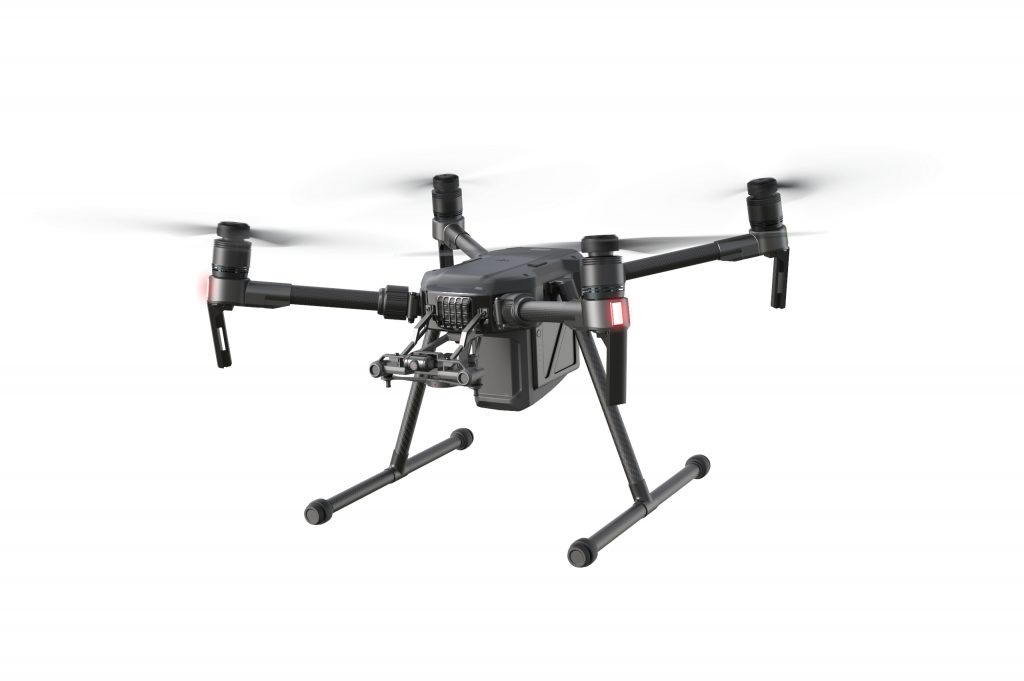
The DJI Matrice 200 and 210 series are designed for demanding aerial operations, including industrial inspections, surveying, mapping, and emergency response. During these tasks, reliable battery performance is essential. However, after extended use, the TB55 battery may start losing capacity, take longer to charge, or fail to hold enough power for a complete flight.
If your DJI Matrice 200 or Matrice 210 RTK aircraft needs frequent battery changes, displays unexpected battery warnings, or shuts down earlier than expected, the TB55 battery may be reaching the end of its service life.
This guide explains common DJI TB55 battery problems, how to identify battery damage, and when replacing the battery with a compatible 7660mAh TB55 replacement battery may be a practical solution.
Why Does the DJI TB55 Battery Drain Quickly?
Short battery life is one of the most noticeable problems with an aging DJI TB55 battery. A fully charged battery may provide considerably less flight time than it did when new.
Several factors can contribute to this issue.
First, repeated charging and discharging gradually reduce the battery’s available capacity. As the battery ages, it may no longer store enough energy to support extended flight operations.
Second, demanding flight conditions can increase power consumption. Carrying additional equipment, flying against strong winds, operating in cold weather, and performing frequent takeoffs or hovering can all reduce flight time.
Another warning sign is an unusually rapid battery percentage drop. For example, the battery indicator may decrease quickly even during relatively light operations. If this happens repeatedly under similar conditions, battery degradation should be considered.
For professionals using the Matrice 200 and 210 series, reduced flight time can interrupt inspection schedules, surveying work, and other outdoor operations. Replacing a worn-out TB55 battery can help restore more dependable power capacity.
Why Is the DJI TB55 Battery Not Charging?
A DJI TB55 battery that refuses to charge can prevent the aircraft from being prepared for its next mission. Before deciding that the battery needs replacement, check the charging system and battery condition.
Common causes include:
Battery aging: Internal battery degradation can affect charging performance. An older battery may take an unusually long time to charge or fail to reach its normal capacity.
Charger or connection problems: A loose connection, damaged charging cable, or faulty charger can interrupt the charging process. Check the charging equipment and connectors before assuming the battery is defective.
Temperature conditions: Lithium batteries have operating and charging temperature limits. If the battery is too hot or too cold, its protection system may prevent charging. Allow it to return to an appropriate temperature before trying again.
Battery protection activation: Abnormal voltage, temperature, or cell conditions may trigger battery protection. Check the battery indicators and DJI application warnings for more information.
If the TB55 battery still cannot charge after checking the charger, connections, and temperature, its internal battery condition may need professional inspection. Do not attempt to force-charge a damaged or swollen battery.
How to Tell If Your DJI TB55 Battery Is Damaged
Recognizing battery problems early can help prevent unexpected interruptions during flight operations.
Here are several signs worth checking:
1. Significantly Reduced Flight Time
If your Matrice 200 or Matrice 210 aircraft flies for much less time than before under comparable conditions, the TB55 battery may have lost considerable capacity.
2. Abnormal Battery Percentage Changes
A battery percentage that drops suddenly, fluctuates, or does not accurately reflect the remaining power may indicate an internal battery problem.
3. Charging Difficulties
Repeated charging failures, unusually slow charging, or an inability to reach a full charge can indicate battery deterioration.
4. Battery Error Messages
Pay attention to battery warnings displayed by the aircraft or DJI application. Persistent errors related to voltage, temperature, or battery cells should not be ignored.
5. Physical Damage or Swelling
Inspect the battery housing and connectors before use. Swelling, cracks, leakage, unusual odors, or signs of overheating indicate that the battery should be taken out of service.
You can also check the battery information and available health indicators through the supported DJI application or diagnostic procedures. If abnormal cell readings or persistent warnings appear, arrange a professional inspection rather than continuing to fly with an unreliable battery.
Choosing a 7660mAh TB55 Battery Replacement
When the original TB55 battery can no longer provide dependable performance, choosing a compatible replacement is an important step.
The 7660mAh TB55 battery replacement is designed for use with compatible DJI Matrice 200 and 210 RTK series equipment. Selecting a replacement with the correct battery model and electrical specifications helps ensure compatibility with the aircraft.
Before purchasing, check the following details:
- Battery model: TB55
- Capacity: 7660mAh
- Compatible equipment: DJI Matrice 200 and compatible Matrice 210 RTK series models
- Connector and physical dimensions
- Charging and battery management compatibility
Always verify the exact aircraft model and battery requirements before installation. Battery compatibility should not be determined by capacity alone.
Common Applications of the DJI Matrice 200 and 210 TB55 Battery
The Matrice 200 and 210 series are frequently used in professional environments where stable power is important.
Industrial Equipment Inspections
Engineers use these drones to inspect power lines, transmission towers, bridges, and industrial facilities. A dependable TB55 battery helps reduce interruptions during inspection flights.
Surveying and Mapping
Surveying teams rely on consistent flight performance to collect aerial images and geographical data. A battery with adequate capacity supports more predictable mission planning.
Construction Site Monitoring
Construction professionals use aerial footage to monitor project progress, inspect structures, and document large work areas. Reliable battery performance helps keep scheduled operations on track.
Public Safety and Emergency Response
During search operations, disaster assessments, and emergency monitoring, unexpected battery problems can interrupt important aerial tasks. Maintaining healthy batteries is essential for operational readiness.
Agricultural and Environmental Monitoring
Drones can also support land surveys, vegetation monitoring, and environmental observations. A properly functioning TB55 battery helps provide consistent power during outdoor operations.
Tips for Maintaining Your TB55 Battery
Good battery management can help reduce unnecessary wear and identify potential problems early.
Avoid storing the battery in extremely hot or cold environments. Keep it away from direct sunlight, moisture, and sources of heat.
Follow DJI’s recommended charging and storage procedures. Avoid leaving a fully discharged battery unused for extended periods, and inspect the battery regularly for physical damage.
Before each flight, check the battery status, charge level, temperature, and any warning messages. For professional operations, maintaining multiple healthy batteries can also help reduce downtime.
If a battery becomes swollen, overheats, leaks, or shows other signs of damage, stop using it and follow the appropriate battery safety and disposal procedures.
Frequently Asked Questions
Q1: Which battery model is used by the DJI Matrice 200 and 210 series?
The DJI Matrice 200 and compatible Matrice 210 series aircraft use the TB55 battery. Always confirm compatibility with your exact aircraft configuration.
Q2: Why does my DJI TB55 battery lose power so quickly?
Battery aging and reduced capacity are common reasons. Cold weather, strong winds, additional payloads, and demanding flight operations can also increase power consumption.
Q3: Can a DJI TB55 battery be replaced if it no longer charges?
Yes, replacement may be necessary if the battery has deteriorated or developed an internal fault. However, check the charger, connections, and operating temperature first.
Q4: How can I check whether my TB55 battery needs replacement?
Look for reduced flight time, abnormal percentage changes, charging failures, persistent battery warnings, and physical damage. Battery health information and diagnostic results can help confirm the problem.
Q5: Is the 7660mAh TB55 battery replacement suitable for DJI Matrice 200 and 210 RTK drones?
It is intended for compatible DJI Matrice 200 and 210 RTK series equipment. Verify your exact aircraft model and battery specifications before ordering.
A DJI TB55 battery with reduced capacity, charging difficulties, or inconsistent power output can affect the reliability of Matrice 200 and 210 RTK flight operations. Identifying these symptoms early helps prevent unexpected interruptions during professional aerial work.
If your existing battery no longer provides dependable performance, a compatible 7660mAh TB55 battery replacement is worth considering. Always verify model compatibility and battery condition before returning the aircraft to operation.