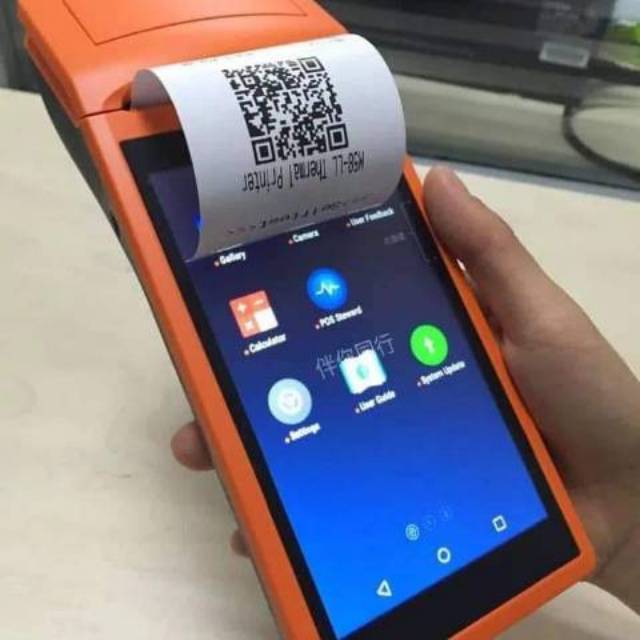
The Sunmi V1 Automatic Printer is designed for convenient mobile printing in retail, restaurants, logistics, ticketing, and other business environments. As a portable device, its battery plays an important role in keeping the printer available throughout the working day.
If your Sunmi V1 battery drains quickly, cannot hold a charge, or refuses to charge at all, the battery may have reached the end of its service life. A 4950mAh W5900 battery replacement for Sunmi V1 can be a practical solution for restoring reliable operating time.
Why Does the Sunmi V1 Battery Drain Quickly?
A noticeable reduction in battery life is one of the first signs of battery aging. A new or healthy battery should provide sufficient power for normal printing tasks, while an aging battery may lose capacity and require frequent charging.
Several factors can cause the Sunmi V1 battery to drain quickly:
- The battery has been used for a long time and its capacity has naturally decreased.
- Frequent printing and continuous operation increase power consumption.
- The printer is used heavily throughout the day.
- The battery has been exposed to unsuitable temperatures.
- Repeated charging cycles have reduced the battery’s effective capacity.
- The battery has developed an internal fault.
If the Sunmi V1 shuts down unexpectedly even when the battery indicator still shows remaining power, the battery may no longer be able to deliver stable power.
Sunmi V1 Battery Cannot Be Charged
Another common problem is that the Sunmi V1 battery does not charge.
Before replacing the battery, it is worth checking the charging accessories and connections. Make sure the charging cable and power adapter are working correctly and that the charging port is clean and undamaged.
If the printer still cannot charge after checking these basic factors, the battery may be the source of the problem.
Possible symptoms include:
- The battery percentage does not increase after connecting the charger.
- The device turns off immediately after being disconnected from the charger.
- Charging takes significantly longer than before.
- The battery indicator remains at a very low level.
- The printer repeatedly starts and stops charging.
- The battery becomes unusually warm during charging.
When these symptoms continue despite using a suitable charger, replacing the battery may help restore normal operation.
How to Tell If the Sunmi V1 Battery Is Damaged
Not every battery problem means the battery itself needs replacement. However, several symptoms can indicate that the original battery has significantly degraded.
1. Extremely Short Battery Life
If the Sunmi V1 used to operate for a long period but now requires charging after a short period of printing, the battery’s usable capacity may have decreased.
2. Unexpected Shutdowns
Unexpected power-offs during printing or other operations can indicate that the battery is unable to maintain a stable voltage under load.
3. Charging Problems
A battery that consistently refuses to charge, charges unusually slowly, or immediately loses its charge after unplugging may need to be replaced.
4. Battery Swelling or Physical Damage
Inspect the battery for visible swelling, deformation, leakage, or other physical damage. Do not use or charge a battery that appears swollen or damaged. Stop using the device and handle the battery according to appropriate battery-safety procedures.
5. Rapid Battery Percentage Changes
If the battery level suddenly falls from a high percentage to a very low level, the battery may have lost substantial capacity or developed an internal problem.
Why Choose a 4950mAh W5900 Battery Replacement?
The W5900 battery with a 4950mAh capacity is designed as a replacement option for compatible Sunmi V1 Automatic Printer applications.
When choosing a replacement battery, capacity is only one consideration. It is also important to check the battery model, connector, dimensions, voltage, and device compatibility before installation.
A properly matched 4950mAh W5900 replacement battery can help provide:
- More reliable operating time
- Reduced need for frequent charging
- Better support for mobile printing tasks
- A practical solution for an aging original battery
- Greater convenience for users who operate the printer away from a fixed power source
Always confirm the battery specifications and compatibility with your particular Sunmi V1 model before purchasing.
Where Is the Sunmi V1 Automatic Printer Used?
The Sunmi V1 is suitable for various mobile business applications where portable printing is required.
Retail Stores
Retail employees can use portable printers for receipts, order information, labels, or other documents without being tied to a fixed workstation.
Restaurants and Cafés
In restaurants, portable printing equipment can support order management and receipt printing, particularly when employees need to move between different areas.
Logistics and Delivery
For delivery and logistics operations, portable printing can be useful when documentation or labels need to be produced directly at the point of service.
Ticketing and Event Services
Portable printers can also be useful in ticketing, event management, and other environments where staff need to print information while moving between locations.
Mobile Business Operations
For field workers and businesses that operate outside traditional office environments, a reliable replacement battery can help reduce interruptions caused by limited battery life.
Tips for Extending Sunmi V1 Battery Life
A replacement battery can restore usable capacity, but proper usage can also help extend battery performance.
Avoid exposing the printer to extreme temperatures and use a compatible charging solution. If the device will not be used for an extended period, store it according to the manufacturer’s recommendations.
It is also useful to monitor changes in battery performance. If operating time suddenly becomes much shorter, investigate the issue early rather than waiting until the printer can no longer operate normally.
Choose the Right W5900 Battery Replacement
A reliable battery is essential for a portable printer that needs to operate throughout the working day. If your Sunmi V1 Automatic Printer has a short battery life, charging problems, unexpected shutdowns, or other battery-related issues, the original battery may have reached the end of its useful life.
The 4950mAh W5900 battery replacement for Sunmi V1 provides a practical replacement option for compatible devices. Before ordering, carefully verify the battery model, capacity, voltage, connector, dimensions, and compatibility to ensure the replacement is suitable for your printer.