What Is a PSP Battery and Why Does It Matter?
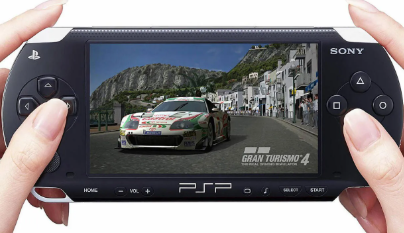
The PSP battery is the core power source of the Sony PSP (PlayStation Portable). Whether you’re revisiting classic games or using it as a media device, a healthy battery ensures smooth performance and portability.
Over time, PSP batteries naturally degrade, leading to shorter playtime, unexpected shutdowns, or charging issues. Understanding how your battery works—and when to replace it—is essential for keeping your device running properly.
How Long Does a PSP Battery Last?
A standard PSP battery typically lasts:
- 4 to 6 hours of gameplay on a full charge
- Up to 8 hours for lighter activities like music playback
However, battery life depends on several factors:
- Screen brightness settings
- Game intensity (3D games drain faster)
- Wi-Fi usage
- Battery age and health
After 2–3 years of regular use, most PSP batteries start losing capacity. If your device only lasts 1–2 hours, it’s likely time for a replacement.
PSP Battery NZ: Where to Buy and What to Look For
If you’re searching for a PSP battery NZ, there are several options available:
- Local electronics retailers
- Online marketplaces (like Trade Me or Amazon)
- Specialized battery replacement stores
When buying a replacement battery, consider:
- Capacity (mAh): Higher capacity (e.g., 1200mAh–2200mAh) = longer usage
- Compatibility: Ensure it matches your PSP model (PSP-1000, 2000, 3000)
- Quality & safety: Choose certified or well-reviewed brands
Avoid extremely cheap batteries, as they may have poor performance or safety risks.
How to Check PSP Battery Health
If you suspect your battery is failing, here’s how to check your PSP battery condition:
1. Check Battery Info in Settings
- Turn on your PSP
- Go to Settings > System Settings > Battery Information
- Review:
- Remaining charge
- Charging status
- Power source
2. Observe Battery Behavior
Warning signs include:
- Battery drains very quickly
- PSP shuts down suddenly
- Device only works when plugged in
3. Physical Inspection
Remove the battery and check for:
- Bulging or swelling
- Overheating
- Leakage
If you notice any of these issues, stop using the battery immediately and replace it.
How to Replace a PSP Battery
Replacing a PSP battery is simple:
- Turn off the device
- Open the battery cover on the back
- Remove the old battery
- Insert the new compatible battery
- Close the cover and fully charge before use
No technical skills are required, making it a quick and cost-effective fix.
Tips to Extend PSP Battery Life
To get the most out of your PSP battery:
- Lower screen brightness
- Turn off Wi-Fi when not needed
- Avoid overcharging
- Store the battery in a cool, dry place
- Use the device regularly (don’t leave it unused for long periods)
A reliable PSP battery is essential for enjoying your gaming experience without interruptions. If you’re in New Zealand looking for a PSP battery NZ, focus on quality, compatibility, and capacity.
By understanding how long a PSP battery lasts and how to check PSP battery health, you can easily decide when it’s time for a replacement—and keep your PSP running like new.